Execution & Impact
Passkey adoption | Verizon
Lead Designer · Authentication · Cross-functional team · 1-2 years
Lead Designer · Authentication · Cross-functional team · 1-2 years
Overview
Verizon’s password-based sign-in was failing nearly half of all attempts, and generating over 57,600 support calls a month. Increasing passkey adoption was OKR #1 for the authentication team. I was brought in to design the end-to-end passkey experience and build the strategy for how and when to introduce it to millions of customers, without disrupting the flows they were already in.
Overview
Verizon’s password-based sign-in was failing nearly half of all attempts, and generating over 57,600 support calls a month. Increasing passkey adoption was OKR #1 for the authentication team. I was brought in to design the end-to-end passkey experience and build the strategy for how and when to introduce it to millions of customers, without disrupting the flows they were already in
Impact
• First among the big 3 US telecoms to launch passkey authentication for customers
• 98%+ passkey sign-in success rate, compared to 76.2% for web login overall
• 79.6K+ passkey enrollments across all flows, July 2026
• 44,270 enrollments driven by the Forgot Password flow, the single largest channel, validating the original strategy bet
• 69 million login attempts per month across app and web
Impact
• First among the big 3 US telecoms to launch passkey authentication for customers
• 98%+ passkey sign-in success rate, compared to 76.2% for web login overall
• 79.6K+ passkey enrollments across all flows, July 2026
• 44,270 enrollments driven by the Forgot Password flow, the single largest channel, validating the original strategy bet
• 69 million login attempts per month across app and web
Impact
• First among the big 3 US telecoms to launch passkey authentication for customers
• 98%+ passkey sign-in success rate, compared to 76.2% for web login overall
• 79.6K+ passkey enrollments across all flows, July 2026
• 44,270 enrollments driven by the Forgot Password flow, the single largest channel, validating the original strategy bet
• 69 million login attempts per month across app and web
98%
Passkey sign-in
success rate
76%
Overall sign-in
success rate
79.6K
Total passkey enrollments across all flows, July 2026
98%
Passkey sign-in
success rate
76%
Overall sign-in
success rate
79.6K
Total passkey enrollments across all flows, July 2026
The Problem
Half of all login attempts on Verizon.com were failing. Passkeys offered a dramatically better experience, device-bound, biometric, phishing-resistant. But there was no designed path to enroll, and no strategy for how to introduce them without interrupting what customers were trying to do.
My mandate: design the full end-to-end passkey enrollment experience and define when and how to surface it to millions of users.
The Problem
Half of all login attempts on Verizon.com were failing. Passkeys offered a dramatically better experience, device-bound, biometric, phishing-resistant. But there was no designed path to enroll, and no strategy for how to introduce them without interrupting what customers were trying to do.
My mandate: design the full end-to-end passkey enrollment experience and define when and how to surface it to millions of users.
Approach
1. Research first, before a single screen
Leadership and stakeholders had low confidence in passkey adoption. Before designing anything, I spearheaded a passkey awareness study, surveying 300 My Verizon app users and 300 My Verizon website users.
The results were decisive:
66% of app users were already aware of passkeys without any explanation
73% of website users were aware without any prompt
Among those familiar, usage intent was strong in both groups
That data changed the conversation. It gave leadership the confidence to fund the project, and moved the team from 'will customers even want this?' to 'how do we get this in front of them?'
Approach
1. Research first, before a single screen
Leadership and stakeholders had low confidence in passkey adoption. Before designing anything, I spearheaded a passkey awareness study, surveying 300 My Verizon app users and 300 My Verizon website users.
The results were decisive:
66% of app users were already aware of passkeys without any explanation
73% of website users were aware without any prompt
Among those familiar, usage intent was strong in both groups
That data changed the conversation. It gave leadership the confidence to fund the project, and moved the team from 'will customers even want this?' to 'how do we get this in front of them?'
2. Promotion strategy — natural pauses, not interruptions
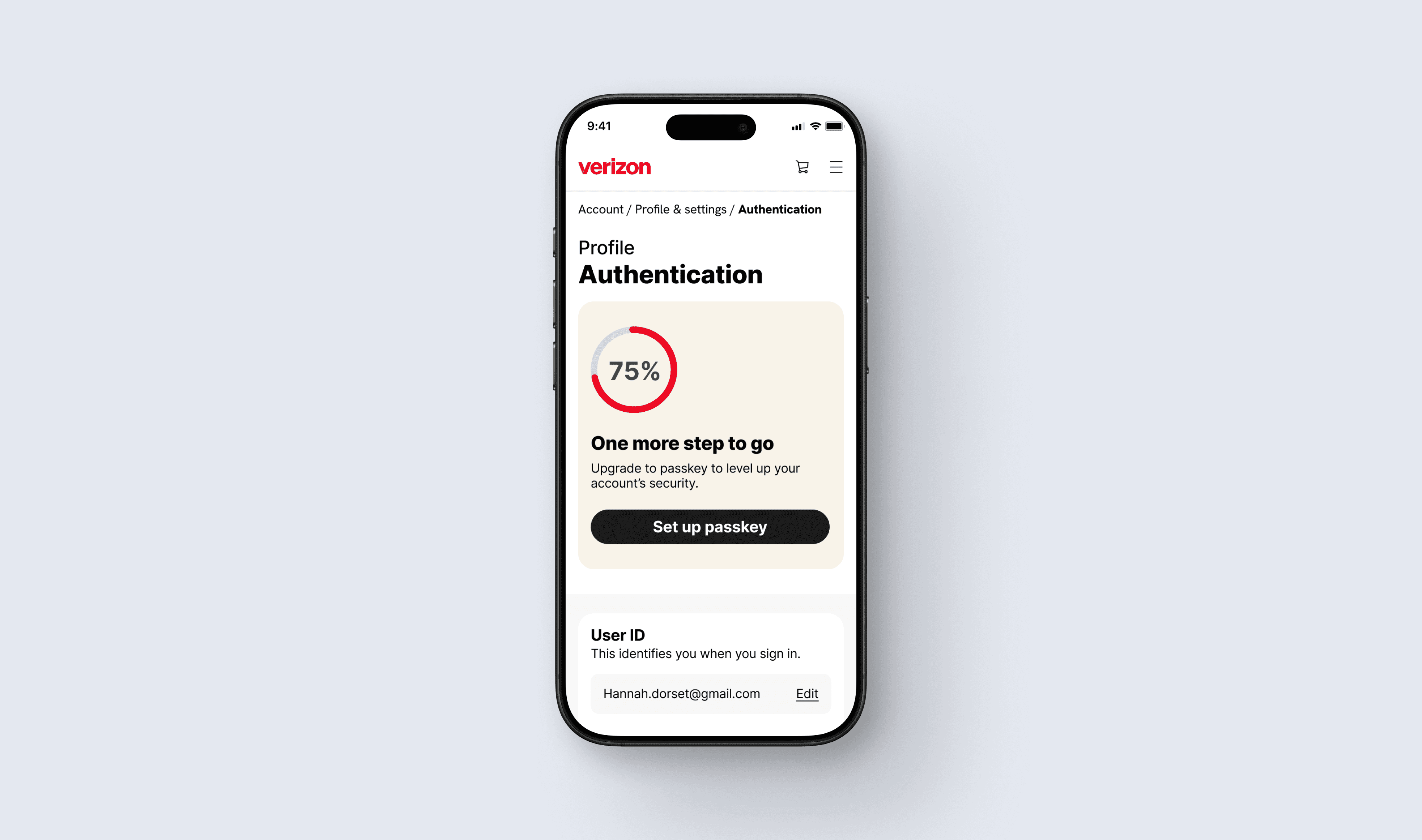
Identified three moments where a customer had just finished a task, verifying their identity, resetting a password, or landing on account settings, and was naturally paused rather than mid-flow. Promoting passkeys here meant the ask never interrupted what someone came to do.
Below: the actual promotional touchpoints customers see at each of these moments.


2. Promotion strategy — natural pauses, not interruptions
Identified three moments where a customer had just finished a task, verifying their identity, resetting a password, or landing on account settings, and was naturally paused rather than mid-flow. Promoting passkeys here meant the ask never interrupted what someone came to do.
Below: the actual promotional touchpoints customers see at each of these moments.
3. E2E enrollment design
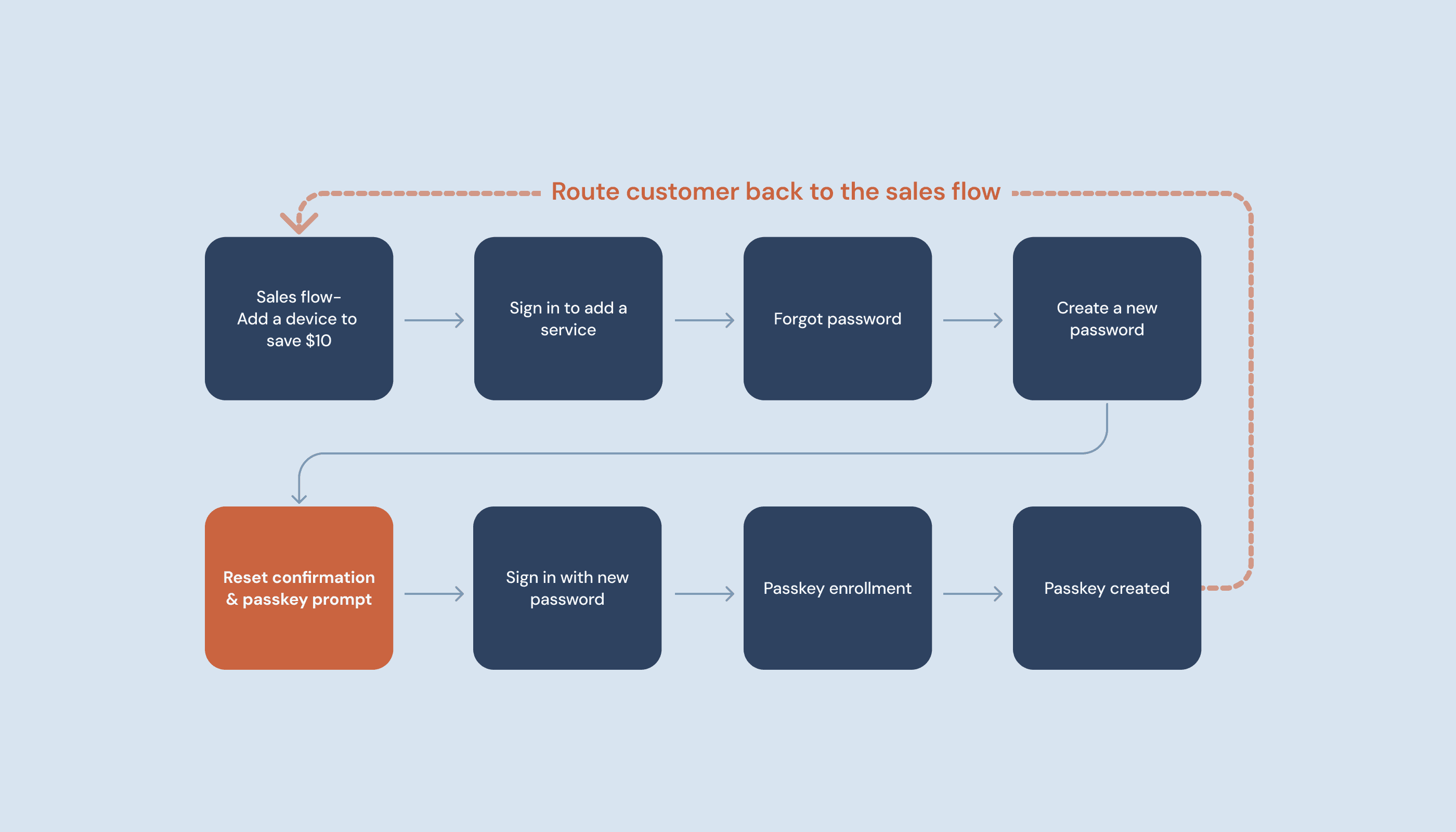
Designed the complete path from each promotional touchpoint through to a created passkey, covering verification, biometric setup, and confirmation.
Below: three full enrollment paths, showing how each promotional moment leads step-by-step to a completed passkey.
3. E2E enrollment design
Designed the complete path from each promotional touchpoint through to a created passkey, covering verification, biometric setup, and confirmation.
Below: three full enrollment paths, showing how each promotional moment leads step-by-step to a completed passkey.
4. Post-enrollment bridge, a requirement I drove
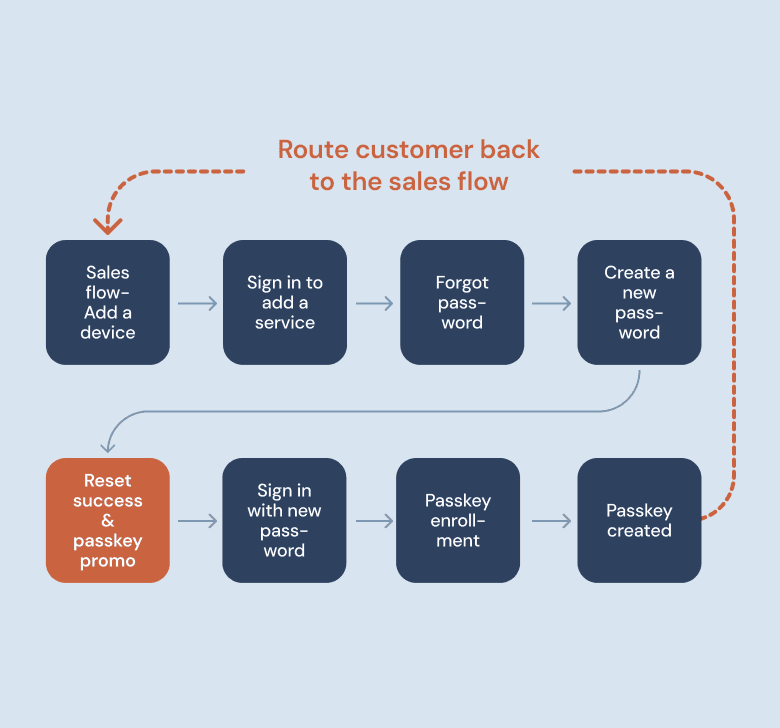
Identified a critical gap: customers who enrolled mid-sales flow had no path back to where they started. I built the use case, brought it to the PM, and it was added as a formal product requirement, ensuring customers could always return to their original context after enrollment.
MVP Launch
November 2025
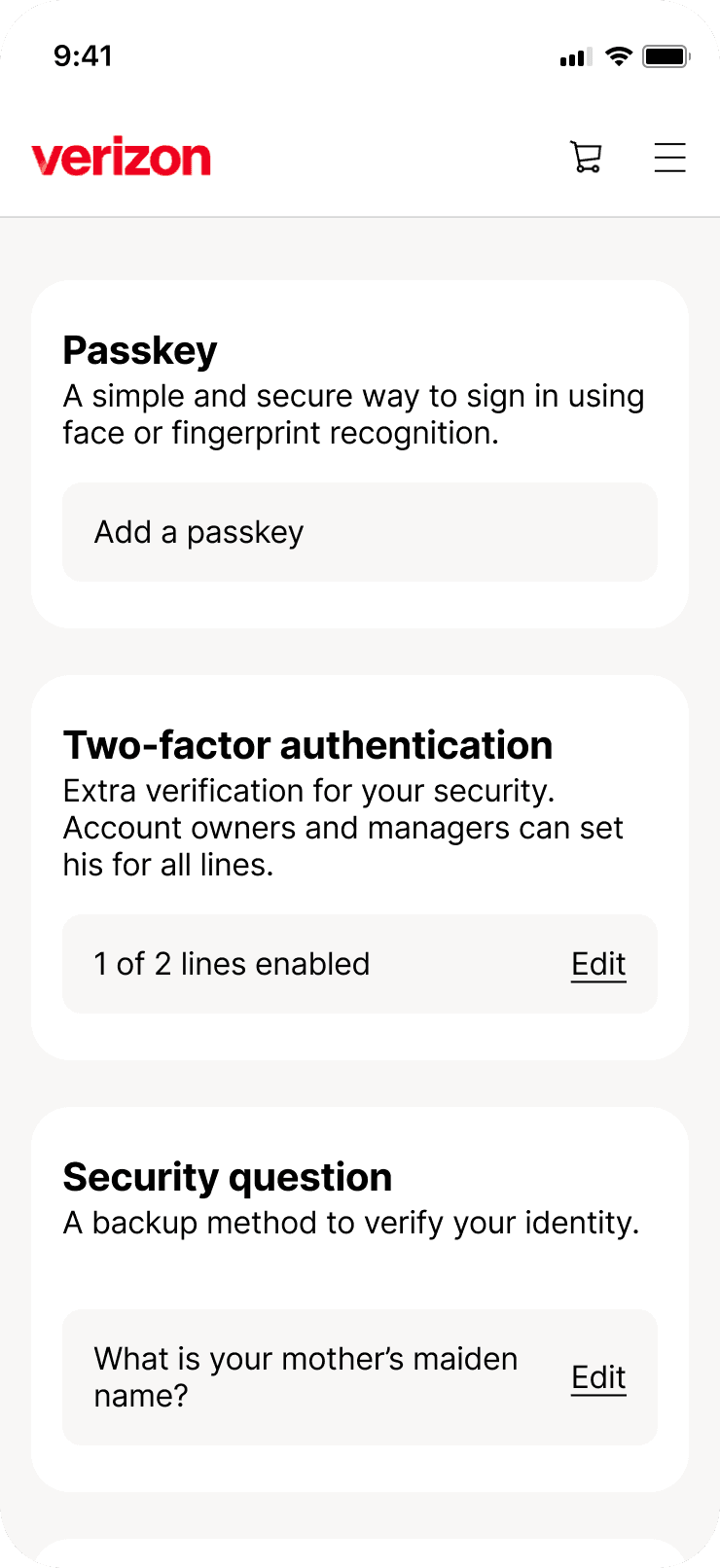
End-to-end passkey enrollment flow via self-discovery
Passkey enrollment CTA in the Forgot Password flow (launched April 2026)
Post-enrollment redirect back to originating context (launched April 2026)
Add a passkey from authentication settings
Post MVP Enhancements
July 2026
Individual passkey identifier
Individual passkey deletion
Skip 2FA logic


Post MVP Enhancements
July 2026
Individual passkey identifier
Individual passkey deletion
Skip 2FA logic


Post MVP Enhancements
July 2026
Individual passkey identifier
Individual passkey deletion
Skip 2FA logic
A moment I'm most proud of
The research study. Stakeholders were skeptical, there was real reluctance to invest in something customers might not want. I pushed for the study, designed the approach, and the results made the case better than any opinion could.
66–73% unaided awareness. Strong usage intent among those familiar. It turned a funding question into a design problem, which is exactly where I wanted it to be.
What this shows
Strategic influence before the work starts, not just after. Research advocacy that unlocked a project. Systems thinking across a multi-surface enrollment experience. And a measurable outcome: the Forgot Password flow alone driving 44,270 enrollments, the single largest channel and proof the original strategy bet paid off, plus a first-mover position no other major US telecom has matched.
Execution & Impact
Passkey adoption | Verizon
Lead Designer · Authentication · Cross-functional team · 1-2 years
Lead Designer · Authentication · Cross-functional team · 1-2 years
Overview
Verizon’s password-based sign-in was failing nearly half of all attempts, and generating over 57,600 support calls a month. Increasing passkey adoption was OKR #1 for the authentication team. I was brought in to design the end-to-end passkey experience and build the strategy for how and when to introduce it to millions of customers, without disrupting the flows they were already in.
Overview
Verizon’s password-based sign-in was failing nearly half of all attempts, and generating over 57,600 support calls a month. Increasing passkey adoption was OKR #1 for the authentication team. I was brought in to design the end-to-end passkey experience and build the strategy for how and when to introduce it to millions of customers, without disrupting the flows they were already in
Impact
• First among the big 3 US telecoms to launch passkey authentication for customers
• 98%+ passkey sign-in success rate, compared to 76.2% for web login overall
• 79.6K+ passkey enrollments across all flows, July 2026
• 44,270 enrollments driven by the Forgot Password flow, the single largest channel, validating the original strategy bet
• 69 million login attempts per month across app and web
Impact
• First among the big 3 US telecoms to launch passkey authentication for customers
• 98%+ passkey sign-in success rate, compared to 76.2% for web login overall
• 79.6K+ passkey enrollments across all flows, July 2026
• 44,270 enrollments driven by the Forgot Password flow, the single largest channel, validating the original strategy bet
• 69 million login attempts per month across app and web
Impact
• First among the big 3 US telecoms to launch passkey authentication for customers
• 98%+ passkey sign-in success rate, compared to 76.2% for web login overall
• 79.6K+ passkey enrollments across all flows, July 2026
• 44,270 enrollments driven by the Forgot Password flow, the single largest channel, validating the original strategy bet
• 69 million login attempts per month across app and web
98%
Passkey sign-in
success rate
76%
Overall sign-in
success rate
79.6K
Total passkey enrollments across all flows, July 2026
98%
Passkey sign-in
success rate
76%
Overall sign-in
success rate
79.6K
Total passkey enrollments across all flows, July 2026
The Problem
Half of all login attempts on Verizon.com were failing. Passkeys offered a dramatically better experience, device-bound, biometric, phishing-resistant. But there was no designed path to enroll, and no strategy for how to introduce them without interrupting what customers were trying to do.
My mandate: design the full end-to-end passkey enrollment experience and define when and how to surface it to millions of users.
The Problem
Half of all login attempts on Verizon.com were failing. Passkeys offered a dramatically better experience, device-bound, biometric, phishing-resistant. But there was no designed path to enroll, and no strategy for how to introduce them without interrupting what customers were trying to do.
My mandate: design the full end-to-end passkey enrollment experience and define when and how to surface it to millions of users.
Approach
1. Research first, before a single screen
Leadership and stakeholders had low confidence in passkey adoption. Before designing anything, I spearheaded a passkey awareness study, surveying 300 My Verizon app users and 300 My Verizon website users.
The results were decisive:
66% of app users were already aware of passkeys without any explanation
73% of website users were aware without any prompt
Among those familiar, usage intent was strong in both groups
That data changed the conversation. It gave leadership the confidence to fund the project, and moved the team from 'will customers even want this?' to 'how do we get this in front of them?'
Approach
1. Research first, before a single screen
Leadership and stakeholders had low confidence in passkey adoption. Before designing anything, I spearheaded a passkey awareness study, surveying 300 My Verizon app users and 300 My Verizon website users.
The results were decisive:
66% of app users were already aware of passkeys without any explanation
73% of website users were aware without any prompt
Among those familiar, usage intent was strong in both groups
That data changed the conversation. It gave leadership the confidence to fund the project, and moved the team from 'will customers even want this?' to 'how do we get this in front of them?'
2. Promotion strategy — natural pauses, not interruptions
Identified three moments where a customer had just finished a task, verifying their identity, resetting a password, or landing on account settings, and was naturally paused rather than mid-flow. Promoting passkeys here meant the ask never interrupted what someone came to do.
Below: the actual promotional touchpoints customers see at each of these moments.
2. Promotion strategy — natural pauses, not interruptions
Identified three moments where a customer had just finished a task, verifying their identity, resetting a password, or landing on account settings, and was naturally paused rather than mid-flow. Promoting passkeys here meant the ask never interrupted what someone came to do.
Below: the actual promotional touchpoints customers see at each of these moments.
3. E2E enrollment design
Designed the complete path from each promotional touchpoint through to a created passkey, covering verification, biometric setup, and confirmation.
Below: three full enrollment paths, showing how each promotional moment leads step-by-step to a completed passkey.
3. E2E enrollment design
Designed the complete path from each promotional touchpoint through to a created passkey, covering verification, biometric setup, and confirmation.
Below: three full enrollment paths, showing how each promotional moment leads step-by-step to a completed passkey.
4. Post-enrollment bridge, a requirement I drove
Identified a critical gap: customers who enrolled mid-sales flow had no path back to where they started. I built the use case, brought it to the PM, and it was added as a formal product requirement, ensuring customers could always return to their original context after enrollment.
MVP Launch
November 2025
End-to-end passkey enrollment flow via self-discovery
Passkey enrollment CTA in the Forgot Password flow (launched April 2026)
Post-enrollment redirect back to originating context (launched April 2026)
Add a passkey from authentication settings
Post MVP Enhancements
July 2026
Individual passkey identifier
Individual passkey deletion
Skip 2FA logic
Post MVP Enhancements
July 2026
Individual passkey identifier
Individual passkey deletion
Skip 2FA logic
Post MVP Enhancements
July 2026
Individual passkey identifier
Individual passkey deletion
Skip 2FA logic
A moment I'm most proud of
The research study. Stakeholders were skeptical, there was real reluctance to invest in something customers might not want. I pushed for the study, designed the approach, and the results made the case better than any opinion could.
66–73% unaided awareness. Strong usage intent among those familiar. It turned a funding question into a design problem, which is exactly where I wanted it to be.
What this shows
Strategic influence before the work starts, not just after. Research advocacy that unlocked a project. Systems thinking across a multi-surface enrollment experience. And a measurable outcome: the Forgot Password flow alone driving 44,270 enrollments, the single largest channel and proof the original strategy bet paid off, plus a first-mover position no other major US telecom has matched.
Execution & Impact
Passkey adoption | Verizon
Lead Designer · Authentication · Cross-functional team · 1-2 years
Lead Designer · Authentication · Cross-functional team · 1-2 years
Overview
Verizon’s password-based sign-in was failing nearly half of all attempts, and generating over 57,600 support calls a month. Increasing passkey adoption was OKR #1 for the authentication team. I was brought in to design the end-to-end passkey experience and build the strategy for how and when to introduce it to millions of customers, without disrupting the flows they were already in.
Overview
Verizon’s password-based sign-in was failing nearly half of all attempts, and generating over 57,600 support calls a month. Increasing passkey adoption was OKR #1 for the authentication team. I was brought in to design the end-to-end passkey experience and build the strategy for how and when to introduce it to millions of customers, without disrupting the flows they were already in
Impact
• First among the big 3 US telecoms to launch passkey authentication for customers
• 98%+ passkey sign-in success rate, compared to 76.2% for web login overall
• 79.6K+ passkey enrollments across all flows, July 2026
• 44,270 enrollments driven by the Forgot Password flow, the single largest channel, validating the original strategy bet
• 69 million login attempts per month across app and web
Impact
• First among the big 3 US telecoms to launch passkey authentication for customers
• 98%+ passkey sign-in success rate, compared to 76.2% for web login overall
• 79.6K+ passkey enrollments across all flows, July 2026
• 44,270 enrollments driven by the Forgot Password flow, the single largest channel, validating the original strategy bet
• 69 million login attempts per month across app and web
Impact
• First among the big 3 US telecoms to launch passkey authentication for customers
• 98%+ passkey sign-in success rate, compared to 76.2% for web login overall
• 79.6K+ passkey enrollments across all flows, July 2026
• 44,270 enrollments driven by the Forgot Password flow, the single largest channel, validating the original strategy bet
• 69 million login attempts per month across app and web
98%
Passkey sign-in
success rate
76%
Overall sign-in
success rate
79.6K
Total passkey enrollments across all flows, July 2026
98%
Passkey sign-in
success rate
76%
Overall sign-in
success rate
79.6K
Total passkey enrollments across all flows, July 2026
The Problem
Half of all login attempts on Verizon.com were failing. Passkeys offered a dramatically better experience, device-bound, biometric, phishing-resistant. But there was no designed path to enroll, and no strategy for how to introduce them without interrupting what customers were trying to do.
My mandate: design the full end-to-end passkey enrollment experience and define when and how to surface it to millions of users.
The Problem
Half of all login attempts on Verizon.com were failing. Passkeys offered a dramatically better experience, device-bound, biometric, phishing-resistant. But there was no designed path to enroll, and no strategy for how to introduce them without interrupting what customers were trying to do.
My mandate: design the full end-to-end passkey enrollment experience and define when and how to surface it to millions of users.
Approach
1. Research first, before a single screen
Leadership and stakeholders had low confidence in passkey adoption. Before designing anything, I spearheaded a passkey awareness study, surveying 300 My Verizon app users and 300 My Verizon website users.
The results were decisive:
66% of app users were already aware of passkeys without any explanation
73% of website users were aware without any prompt
Among those familiar, usage intent was strong in both groups
That data changed the conversation. It gave leadership the confidence to fund the project, and moved the team from 'will customers even want this?' to 'how do we get this in front of them?'
Approach
1. Research first, before a single screen
Leadership and stakeholders had low confidence in passkey adoption. Before designing anything, I spearheaded a passkey awareness study, surveying 300 My Verizon app users and 300 My Verizon website users.
The results were decisive:
66% of app users were already aware of passkeys without any explanation
73% of website users were aware without any prompt
Among those familiar, usage intent was strong in both groups
That data changed the conversation. It gave leadership the confidence to fund the project, and moved the team from 'will customers even want this?' to 'how do we get this in front of them?'
2. Promotion strategy — natural pauses, not interruptions
Identified three moments where a customer had just finished a task, verifying their identity, resetting a password, or landing on account settings, and was naturally paused rather than mid-flow. Promoting passkeys here meant the ask never interrupted what someone came to do.
Below: the actual promotional touchpoints customers see at each of these moments.
2. Promotion strategy — natural pauses, not interruptions
Identified three moments where a customer had just finished a task, verifying their identity, resetting a password, or landing on account settings, and was naturally paused rather than mid-flow. Promoting passkeys here meant the ask never interrupted what someone came to do.
Below: the actual promotional touchpoints customers see at each of these moments.
3. E2E enrollment design
Designed the complete path from each promotional touchpoint through to a created passkey, covering verification, biometric setup, and confirmation.
Below: three full enrollment paths, showing how each promotional moment leads step-by-step to a completed passkey.
3. E2E enrollment design
Designed the complete path from each promotional touchpoint through to a created passkey, covering verification, biometric setup, and confirmation.
Below: three full enrollment paths, showing how each promotional moment leads step-by-step to a completed passkey.
4. Post-enrollment bridge, a requirement I drove
Identified a critical gap: customers who enrolled mid-sales flow had no path back to where they started. I built the use case, brought it to the PM, and it was added as a formal product requirement, ensuring customers could always return to their original context after enrollment.
MVP Launch
November 2025
End-to-end passkey enrollment flow via self-discovery
Passkey enrollment CTA in the Forgot Password flow (launched April 2026)
Post-enrollment redirect back to originating context (launched April 2026)
Add a passkey from authentication settings
Post MVP Enhancements
July 2026
Individual passkey identifier
Individual passkey deletion
Skip 2FA logic
Post MVP Enhancements
July 2026
Individual passkey identifier
Individual passkey deletion
Skip 2FA logic
Post MVP Enhancements
July 2026
Individual passkey identifier
Individual passkey deletion
Skip 2FA logic
A moment I'm most proud of
The research study. Stakeholders were skeptical, there was real reluctance to invest in something customers might not want. I pushed for the study, designed the approach, and the results made the case better than any opinion could.
66–73% unaided awareness. Strong usage intent among those familiar. It turned a funding question into a design problem, which is exactly where I wanted it to be.
What this shows
Strategic influence before the work starts, not just after. Research advocacy that unlocked a project. Systems thinking across a multi-surface enrollment experience. And a measurable outcome: the Forgot Password flow alone driving 44,270 enrollments, the single largest channel and proof the original strategy bet paid off, plus a first-mover position no other major US telecom has matched.